Interface diagnosis, four-direction previews, implementation checks and cover images
Qiaomu Design
From Design Choices to Working Pages
qiaomu-design starts with the task an interface must support, then routes work to diagnosis, four-direction previews, focused polish or a design specification. A chosen direction becomes real project changes and page checks; covers follow a separate image workflow.
 Open the original image
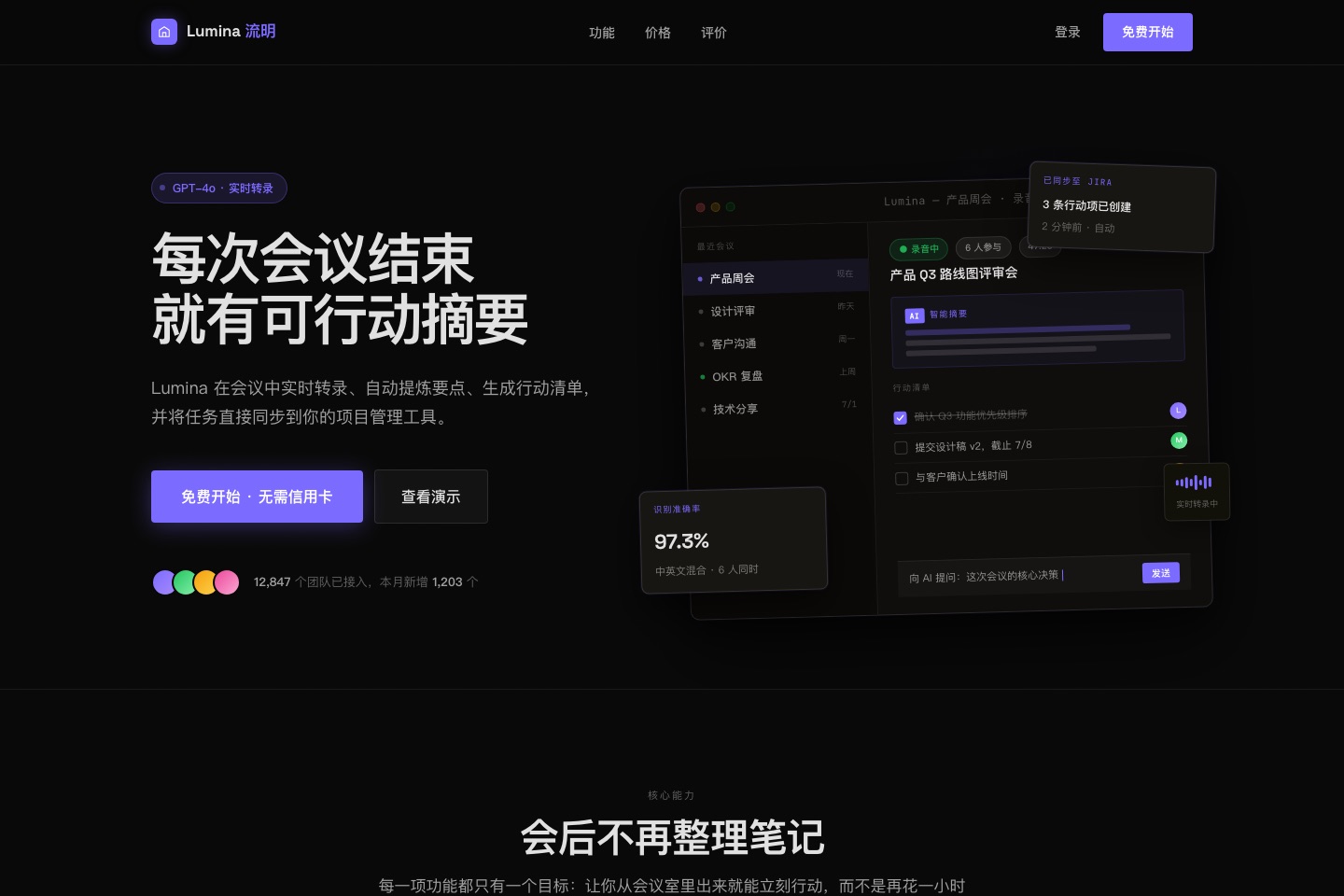
A headline, trial entry and product view organize the opening screen. Use it to inspect the author’s example hierarchy.
View the author’s case sourceOriginal images from the author’s comparison showcase, not generated or run by this site. Business numbers are demonstration content. These historical screenshots do not establish that every check in the current version passed. MIT © 向阳乔木.
Hosts listed by the author
- Claude Code
- Codex
- GitHub stars
- 663
- Version
- 3.10.0
- Checked
- Categories
- Design & VideoProduct & Project
Decide the task before deciding whether to explore four directions
For an existing product, distinguish diagnosis, focused polish and redesign. When a new direction is needed, compare the same real content in four mockups and state what to retain or change. After choosing, check that the implemented page supports the user’s task.
Pick a task and get started
Install in a terminal, confirm that the client discovers qiaomu-design’s root SKILL.md, then open the target project with real materials. Replace the sample filenames, pages and scope. The first task below follows the complete new-design path.
For a new interface or a change of visual direction. Bring real copy, assets, an audience, brand and functional constraints, and a runnable project. You first compare small mockups; implementation follows your selection.
Install in an Agent-Skills-compatible client
Run in a terminal with Node.js and npx. Choose the client and installation scope in the installer, keeping references and scripts. Then ask the client to use qiaomu-design explicitly. The host supplies project execution, browser tools for interfaces and image generation for covers.
Read the author’s setup guidenpx skills add joeseesun/qiaomu-designConfirm the installed folder and a runnable project
The npx installer places the skill according to the chosen client. Locate the actual directory containing the root SKILL.md, references and scripts instead of assuming an example path. For interface work, confirm the project’s existing launch command and supply real copy and constraints. The agent starts the bundled preview service and returns the current URL and index.html path; use the new URL after a restart. Before implementation, confirm that the received direction, settings and notes belong to this round.
Read the installation and environment notesGive your AI this first task
These editorial prompts follow the pinned source and were not run with a model. They describe inputs, interaction and expected outputs. The files, interfaces or images still need to be produced and inspected in your environment.
Use qiaomu-design to redesign the Chinese homepage for the meeting-notes tool in this project. Read brief.md, the existing homepage code, DESIGN.md if present, and the supplied assets. Visitors should understand within three seconds that the tool turns meetings into action items and find the existing trial entry. Preserve the brand name, login route and component library. State the user task, constraints and visual variance, motion and density settings; ask only about essential missing information. Create A/B/C/D as four real mockups in one preview using the same content, with substantial differences in layout, typography and other axes that remain recognizable without color. Save design-previews/YYYY-MM-DD-meeting-home/index.html and provide the local URL and file path. Check desktop and phone presentation, selection buttons, live dial values and the confirmation dialog. Wait for my direction and adjustment notes, and verify that this round’s choice was received before updating DESIGN.md and changing the homepage and directly related files. Use the current agent and preserve existing work. Run the project checks, inspect desktop and mobile behavior, fix the main problems, and report changed files, verified results and missing evidence.
Check what you receive
- Four direction mockups, a short recommendation, adjustable settings and a way to choose. Production implementation waits for your current selection; these are not four finished applications.
- After selection: a project DESIGN.md, actual changes and verification records. Compare the directions first, then test the trial entry, keyboard focus and phone layout. Screenshots and checked boxes do not replace interaction checks.
More about this skill
qiaomu-design is a design workflow for coding agents, rather than a standalone design application. It identifies the page, audience and tone, then states why the page exists, what users should understand within three seconds and what they must be able to do. Visual variance, motion and density settings affect presentation while preserving those tasks. The current agent executes by default; switching to a particular model is not required.
For new work or redesign, the “style fitting room” is an intermediate decision step. One HTML page presents four real, small-scale A/B/C/D mockups using the project’s content to compare layout, typography and color. A direction click or the 1–4 keys opens a confirmation dialog where settings and adjustment notes accompany the choice. Implementation follows confirmation and receipt by the agent. These are not four completed applications.
Implementation first records the direction in the project’s DESIGN.md, then changes real files and covers focus, loading, empty and error states. The author calls for desktop and phone inspection, a focused second pass and removal of unnecessary decoration. An established direction can go straight to polish. An audit-only request should end with findings, without changing the project or forcing a four-direction exercise.
The workflow has strong author preferences, supported by 58 site-reference documents, summaries of Carbon’s component and workflow decisions, and Chinese typography guidance. Select a few useful treatments and adapt them to the existing brand and components. Current user requirements and project facts take priority; reference colors, fonts and general prohibitions need judgment before adoption.
The current version also covers WeChat Official Account covers, Bilibili, YouTube, WeChat image notes and Xiaohongshu. Those paths need real source content, available image-generation tools and inspection of each result. They deliver images and crop or thumbnail views without requiring webpage dials, DESIGN.md or the selection server. Platform presets and click-through advice are not permanent requirements or performance guarantees.
Sources and verification
Sources checked
Read the pinned main skill, installation notes, relevant references and callback scripts, and inspected the original repository case images. The skill was not installed or run; no model, page or cover was generated. Case interactions and outcomes were not tested.