Waza
From deciding what to build to proving the change works
Eight engineering skills connect planning, debugging and review to concrete evidence, continue within authorized scope, and make diagnostic data access explicit.
This page's route and alternatives
- Claude Code: complete waza plugin with /waza: commands
- Codex, generic skills, Claude Desktop and Pi: separate README routes
- GitHub stars
- 7,468
- Version
- 3.40.0
- Checked
Start with one bounded project task
For a first use, try think and request only a plan for your current codebase. Check whether the assistant actually read the code, found existing capabilities and specified observable acceptance criteria. Use hunt for a concrete failure and check for a reviewable change. There is no need to chain all eight skills by default.
Pick a task and get started
Open Claude Code in an existing project, then add the marketplace and install the complete plugin as separate steps. Confirm the skill entries before copying a task below and supplying real inputs and scope.
Use an existing notes app to settle offline edits, reconnection and conflicts. Supply the current code and product constraints; the first pass delivers a plan.
Install the complete Claude Code plugin
Run each line inside Claude Code. The first adds the waza marketplace; the second installs the complete plugin. Invoke namespaced entries such as /waza:think.
Read the author’s setup guide/plugin marketplace add tw93/Waza /plugin install waza@wazaConfirm the entries and working directory
After installation, check the host's skill or command list for /waza:think, /waza:hunt, /waza:check and /waza:health, and confirm access to the current project. Generic skills use bare names; the plugin uses a namespace. Choose one installation route. These repository commands do not pin this page's commit, so check the installed version in the host. Optional rules and the statusline are separate choices.
Read installation and update instructionsGive your AI this first task
These are editorial task examples, not author demonstrations or results measured here. Replace sample filenames with your inputs; the fourth task also needs three absolute paths. The first task authorizes only a plan. Each later example defines its own reads, writes and checks.
/waza:think Plan offline editing for the current notes app: a user can edit the current note without a connection and sync after reconnecting. This round adds no collaboration and implements no application code. Read project instructions, storage and sync code, existing tests and dependency versions first. Treat any existing design summary as a lead and verify it against the current implementation. Check whether the framework or an official library already supplies a suitable capability, citing the applicable version and source. Choose the smallest workable approach to local saves, pending sync, retry, server-side changes and duplicate writes from multiple windows. Ask about missing information that would change the decision; do not invent a database schema or product policy. Write docs/offline-sync-plan.md with goals and exclusions, the chosen approach, actual files and interfaces, the most fragile assumption, independently deliverable steps, and verification and rollback for each. Cover offline edits, reconnecting, sync failure, conflicts and page refresh with isolated local test data. Only this plan file may be written in this round. Read an existing file before updating it. List unresolved decisions and wait for explicit implementation approval; do not edit application code, commit or publish.
Check what you receive
- A project-specific docs/offline-sync-plan.md that explains the path from a local edit to remote synchronization.
- Behavior checks and rollback for each step, with unresolved conflict policy or dependency questions made explicit.
- A plan that can guide implementation after approval; the plan itself is not evidence that offline editing works.
More about this skill
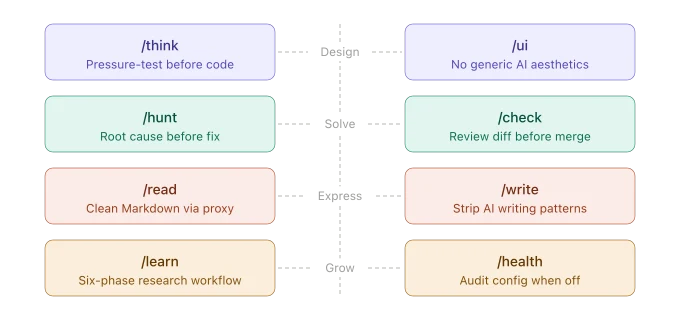
Waza turns Tw93's engineering habits into eight separately callable skills: planning, UI work, debugging, review, reading, research, writing and agent-setup diagnostics. It is primarily a set of working methods for a coding assistant, supported by reference material and helper scripts. The host assistant and project tools still perform code edits, tests, network access and file operations.
It is most useful for a defined task in an existing project. Think settles the problem and implementation decisions; hunt requires reproduction, logs or tests to establish a cause; check connects a change to its callers, artifacts and the project's own verification practices. A concrete symptom, baseline, permitted scope and completion criteria give it more to work with than a broad request to improve the code.
The skills divide responsibility and can continue an authorized workflow. An analysis request does not automatically authorize repairs or publication. A request that already covers implementation, review and follow-through can continue toward that outcome without approval at every internal transition. These are instructions for the assistant, not an enforced permission boundary.
Health examines the agent setup and the reliability of verification, rather than ordinary application errors. Its normal audit can read project and user-level configuration and current-project session history. The fourth task below deliberately limits it to an existing verifier log so the helper's conclusion can be understood precisely. All tasks are editorial examples; this page did not install or run Waza.
Sources and verification
Sources checked
All eight SKILL files, the selected task references and relevant scripts were read in full. The examples are editorial designs; no third-party code was executed.