Kami
From a content brief to a reviewed artifact
Turn supplied material into composed documents: settle the content, fill HTML, export PDF and inspect every page. Editable PPTX and product landing pages use separate routes.
 Open original image
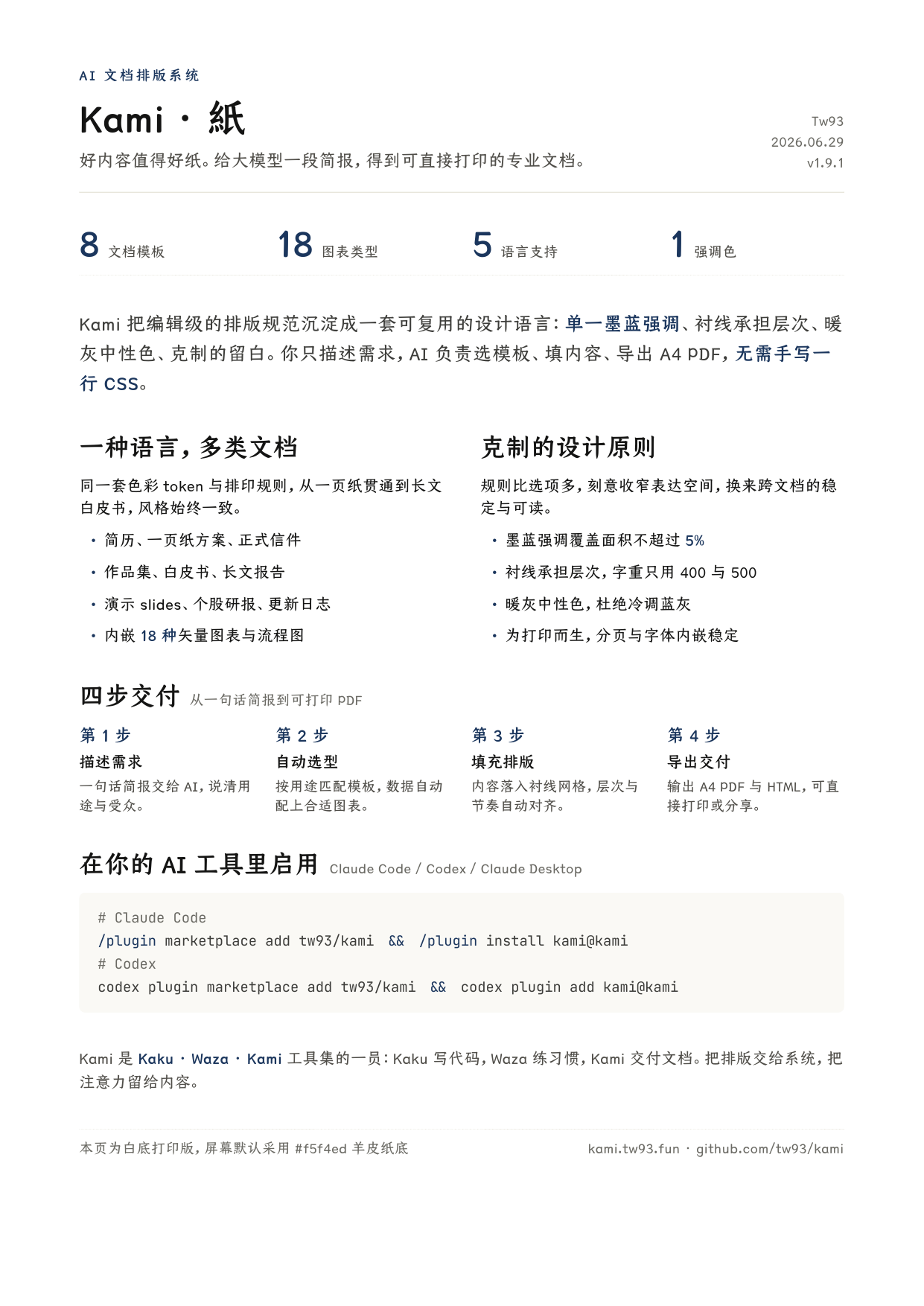
The author’s one-page Kami introduction uses white paper, Chinese serif type and a metric row. The image retains its v1.9.1 label and original example copy.
View author examplesThese are original images linked from the author’s README, not outputs generated or re-typeset here. Historical versions, prices and example claims remain in the images; use this page’s reviewed instructions for current setup and scope.
First-use route on this page
- Claude Code plugin
- Local project files
- Format-specific export tools
- GitHub stars
- 12,132
- Version
- 1.20.0
- Checked
- Categories
- Documents & Slides
Start with one page and a complete set of facts
Choose one audience, one claim and three or four real metrics, then inspect the one-page PDF. Avoid demanding PDF, PPTX, Word and a website in the first attempt: their layout and acceptance work does not transfer automatically.
Pick a task and get started
Install, verify the entry point and prepare material in a project folder. These editorial examples are based on the source; your assistant runs the commands in an environment with the required dependencies.
Bring an audience, a clear claim, three or four verified metrics and a next step. This route suits a brief you need to print or send to a decision maker.
Install inside a Claude Code session
Run each line inside Claude Code. The first adds the marketplace; the second installs the kami plugin. Confirm /kami:kami is available afterward. Other hosts have separate README instructions.
Read the author’s setup guide/plugin marketplace add tw93/kami /plugin install kami@kamiLocate the skill, then diagnose the export environment
The two installation commands add the marketplace and install its plugin separately. Confirm /kami:kami is available and ask the assistant to report the installed SKILL.md directory. Keep documents in your project and call the scripts by their full path. Start with python3 <actual-Kami-directory>/scripts/build.py --doctor, then resolve the dependencies and fonts needed for your format. Do not run build.py without arguments: that builds repository examples.
Read the environment and export guideGive your AI this first task
These are editorial examples to use with your own material. /kami:kami matches the Claude Code plugin route above; use the actual skill entry point in other hosts.
/kami:kami Turn the attached brief.md into a one-page English A4 project proposal for a business lead. Use the white-paper print variant. Deliver proposal.html, proposal.pdf, page PNGs and content.json. Read the installed Kami SKILL.md and locate its actual directory. Work in proposal/ inside this project. Establish the audience, purpose, one-page target, three or four supported metrics, argument, evidence and next step. List missing or conflicting facts before drafting; invent no numbers. Write content.json against the one-pager schema, with brief.template=one-pager-en, page_target=1 and formats=[html,pdf,png]. Copy assets/templates/one-pager-en.html to proposal.html and fill the copy, leaving the installed template intact. From the document directory, run python3 <actual-Kami-directory>/scripts/build.py --doctor, then --check-content content.json using that same full script path. Report missing dependencies or fonts before continuing. Keep images and licensed fonts in the project and fix their HTML paths. Apply production.md’s white-paper recipe to both the canvas and light surfaces. Run python3 <actual-Kami-directory>/scripts/build.py --deliver proposal.html content.json. Fix ERRORs and rerun; explain each WARN and GAP. Open every generated page PNG and confirm one page, complete text, correct type and faithful metrics and sources. Check links and selectable text in the PDF. If image inspection is unavailable, state that visual review is incomplete. Finish with artifact paths, actual page count, check results and unresolved items.
Check what you receive
- Editable proposal.html and content.json, plus proposal.pdf and proposal-visual/page-01.png after a successful export.
- The numbers, sources and next step remain visible; inspect the white-paper surfaces, typography and page edges in the actual output.
- A handoff records the page count and every WARN or GAP. READY does not replace visual inspection.
More about this skill
Kami is Tw93’s document production skill for AI assistants. It combines writing guidance, structured content, HTML and Python templates, and export and checking scripts. It suits project briefs, resumes and presentation material that need a consistent, readable layout. The defaults use warm paper, serif type and restrained ink-blue emphasis; brand colors can change, and documents intended for printers have an explicit white-paper recipe.
The current release still has eight document families: one-pager, long document, letter, portfolio, resume, slides, equity report and changelog. A browser-oriented product landing page is additional. Eight families does not mean eight callable subskills or eight files: language variants and PDF, PPTX and Marp routes have different templates. English and Chinese are the most complete; Japanese and Korean output needs its own font and layout review.
A new document begins with content.json, recording the audience, purpose, formats, length and acceptance criteria. The assistant then fills a chosen template. This JSON is a content record and checking input; the scripts do not automatically lay out arbitrary Markdown or JSON. Ordinary documents keep HTML as the editable source, use WeasyPrint for PDF, and use PyMuPDF for page PNGs. Editable slides use a separate Python PPTX template.
Checks make the handoff more useful: they can flag missing content, page-count issues and the font that actually drew CJK text. They cannot establish factual accuracy, understand the finished page or prove every link works. The actual artifacts still need to be opened, and unresolved issues belong in the handoff.
Sources and verification
Sources checked
Reviewed against author documentation, templates and script source at b311c77c. Author images were visually inspected. We did not install Kami, run exports or test generated results.