Source records, open text, one-hop citations, and local PDF sections
Paper Search MCP
Find papers and check what you retrieved
Give an AI assistant paper search and reading tools while retaining source IDs and the content actually obtained. Choose the right MCP or skill entry point and check each result.
 Open the original image
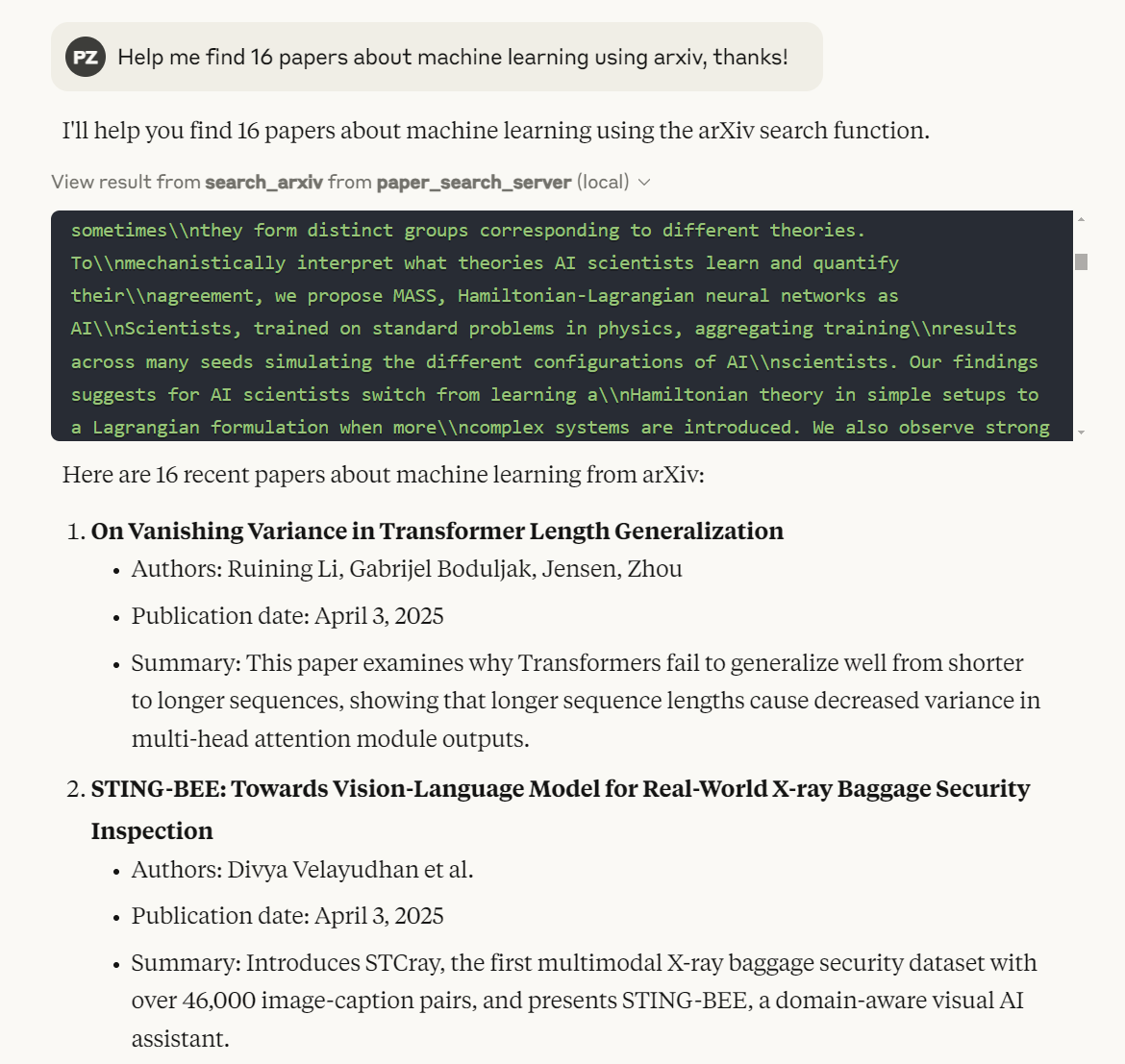
The image shows search_arxiv and returned titles, authors, dates, and abstracts. Identity checks and full-text retrieval remain separate steps.
View the author’s demonstrationAn original screenshot from the author’s README showing a tool call and candidate list. It is not our run and does not verify current availability across sources. The pictured paper metadata was not independently checked. MIT © 2025 OPENAGS.
Available entry points
- Local stdio MCP clients
- Claude Code + CLI skill
- Command line
- DSH profiles
- GitHub stars
- 2,950
- Version
- 0.1.4
- Checked
- Categories
- Content & KnowledgeWriting & Research
Useful for turning discovery into material you can inspect
Start with a small question and a few sources. Preserve records and failures, then verify identities and retrieve selected papers. Keep subsequent review notes explicit about what was actually read and what remains missing.
Pick a task and get started
Obtain the pinned source and inspect its tools, then connect that same checkout to your client. The six tasks cover discovery, citation identity, retrieval, citation expansion, section locations, and existing institutional access.
Choose a question, sources, and a per-source limit to build a screening list with a visible search scope.
Get the reviewed source and list its tools
Run from a location without an existing paper-search-mcp subdirectory. The final line lists this checkout’s registered tools rather than querying papers; the first uv run installs dependencies. The checkout is pinned to the reviewed commit, which the matching PyPI version label 0.1.4 cannot substitute for.
Read the author’s setup guidegit clone https://github.com/openags/paper-search-mcp.git cd paper-search-mcp git checkout cab1b5cc276a0cd004a0044003926a6440088049 mkdir -p downloads uv run -m paper_search_mcp.cli tool --listConnect the same checkout to an MCP client
Claude Desktop uses ~/Library/Application Support/Claude/claude_desktop_config.json on macOS and %APPDATA%\Claude\claude_desktop_config.json on Windows. Merge this entry into mcpServers, preserving existing services; other hosts have their own MCP configuration entry point. Replace both /absolute/path/to/... values with the actual checkout path, and use an absolute uv executable path if the client cannot find it. Save, restart the client, and confirm tool discovery before sending a task. The download directory is also the section tool’s readable root.
Read the author’s source-launch instructions{ "mcpServers": { "paper-search-mcp": { "command": "uv", "args": [ "run", "--directory", "/absolute/path/to/paper-search-mcp", "-m", "paper_search_mcp.server" ], "env": { "PAPER_SEARCH_MCP_TRANSPORT": "stdio", "PAPER_SEARCH_MCP_SECTION_PDF_ROOT": "/absolute/path/to/paper-search-mcp/downloads" } } } }Give your AI this first task
These editorial prompts are examples, not observed results. Replace the bracketed material and send one to an assistant with the tools connected. Tables and notes are prepared by the assistant; the service returns records, text, or file paths.
Use the connected Paper Search MCP for this question: [one specific research question]. Keywords and synonyms: [search terms]. Include: [years, population or subject, and publication types]. Exclude: [out-of-scope material]. Confirm that search_papers is available before searching. Start with search_papers(query="[terms]", sources="arxiv,crossref,openalex", max_results_per_source=5). The limit is 5 per source. Do not use the CLI presets fast/fastest as MCP source names, or claim that year filters these three sources. Keep the actual arguments and raw response. Check sources_used, source_results, and errors, then screen by the real publication date and available abstract. Flag placeholder dates, missing abstracts, and source failures; an empty result is not proof that no relevant research exists. For a strict date range, use the dedicated Crossref/OpenAlex tools with a filter and record it. Build a candidate table with title, authors, year and date precision, source, paper_id, DOI, original URL, abstract availability, and an include/exclude/unresolved reason. Check duplicate titles and preprint versus published versions; automatic deduplication does not verify versions. State which sources this round covered and which remain unresolved. Do not infer paper findings from titles alone.
Check what you receive
- A candidate table, actual query arguments, per-source counts, and failure notes.
- A DOI or source ID, original link, and screening reason for each candidate; missing fields remain unresolved.
- Checked dates, versions, and coverage. This round does not establish an exhaustive systematic-review search.
More about this skill
Paper Search MCP connects paper search, selected PDF downloads, and text extraction to an AI assistant. Its core is a Python tool service. The repository also supplies a paper-search skill that guides Claude Code through the CLI, and a separate MCP-oriented skill for DSH. Start by choosing how your host will run the tools, then decide whether you need records, readable text, or more papers connected by citations.
Unified search queries selected sources concurrently and performs basic deduplication by DOI or title and authors. Per-source counts and some failures help expose gaps, but database query syntax is not unified and an empty result does not necessarily mean no literature exists. The shared year argument applies only to Semantic Scholar, and result limits are per source. Dates, publication types, and preprint versus published versions still need checking.
Finding a record and reading a paper are separate outcomes. PubMed and Crossref are useful discovery routes; full-text access depends on the connector, an available open copy, and permissions. Download fallback tries open repositories but may return only a failure explanation. Record existence, PDF identity, and support for a particular claim are also separate checks. The service does not turn them automatically into a verified literature review.
The current source adds one-hop OpenAlex citation lookups, section extraction from existing PDFs, and explicitly selected WoS/Scopus connectors. Section extraction needs machine-readable text and a POSIX environment; institutional sources need existing credentials and actual entitlement. These tools help move from candidates to material you can inspect before a separate review or research workflow.
This page follows the fixed source commit dated October 2, 2026. At review time, PyPI still listed a July upload of 0.1.4, while this source also declared 0.1.4. Matching version labels do not establish that the published package contains later additions. The first-use path therefore pins the source and lists its tools; existing installations should check their actual tool inventory.
Sources and verification
Sources checked
Reviewed the pinned README, both skills, integration guides, and relevant search, download, citation, and section code, and inspected the author’s demo image. We did not install or run the service, perform academic searches or model tasks, or validate generated output quality.