31 analytical workflows, selected by task and grounded in your data
Data Analytics Skills
From Data Checks to Decisions
Nimrod Fisher’s collection covers data quality, metric documentation, analytical investigation, visualization specifications and communication. Supply your data and business definitions, choose a workflow and retain reviewable outputs. Scripts and templates vary across skills.
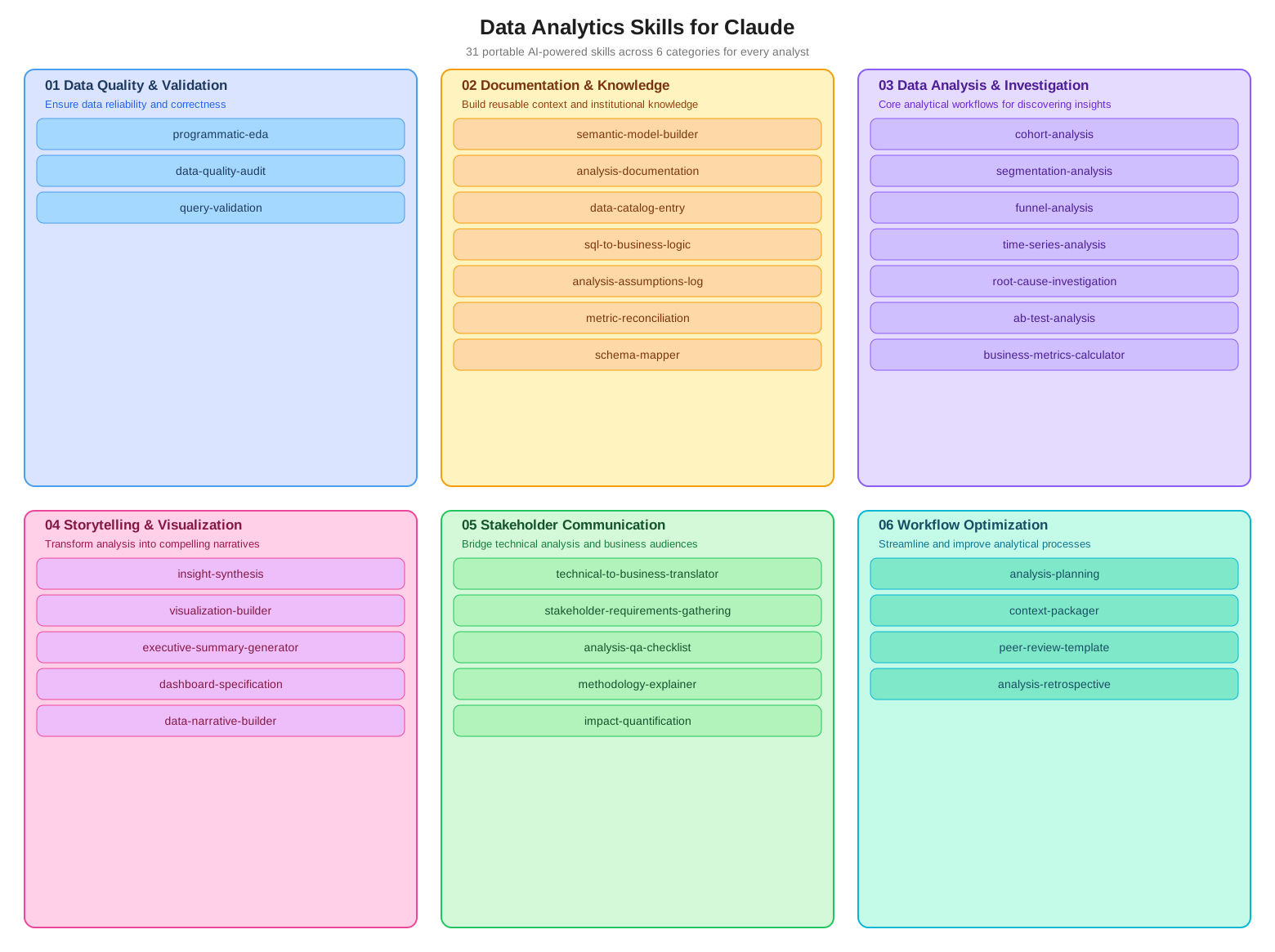 Open the full map
Choose a stage, then a specific skill. You do not need all 31 installed at once.
View the author’s sourceThe repository’s map of 31 skills, with the original English labels. It is a directory map, not an analysis report or a site-tested result. MIT © 2026 Nimrod Fisher.
Entry points
- Claude Code
- Codex
- Agent Skills-compatible assistants
- GitHub stars
- 507
- Checked
- Categories
- Content & KnowledgeProduct & Project
Understand one dataset before explaining one result
Begin with a CSV quality check. Reconcile definitions when reports disagree, then choose the experiment, dashboard or communication task you need. Every reported number should trace to real inputs and run records.
Pick a task and get started
Choose one task below. Its installation example changes with the selection and uses the current project’s Codex skills directory. Prepare the required files, then send the prompt in an assistant session that can access the project.
Start here with a real, shareable CSV. Explain what one row represents, its period and the intended question. This run assesses whether the data can support further analysis.
Install the selected skill in your analysis project
These commands target a macOS, Linux or WSL shell. Run them from the analysis project to install the selected skill for Codex. Changing the task changes the copied folder; skip cloning an existing checkout. See below for native Windows and Claude Code destinations.
Read the author’s setup guidegit clone https://github.com/nimrodfisher/data-analytics-skills.git mkdir -p .agents/skills cp -R data-analytics-skills/01-data-quality-validation/programmatic-eda .agents/skills/Confirm location, supporting files and calculation tools
Work from the analysis project root. Use the commands above in a macOS, Linux or WSL shell; clone once, then reuse the checkout for later copy steps. On native Windows, clone with Git, create .agents/skills inside the project in File Explorer, and copy the selected skill folder into it. Use .claude/skills instead for Claude Code. Check an existing same-named skill before replacing it, and preserve scripts, references and assets. Reopen the project session and confirm the assistant can read its SKILL.md. Prepare real inputs and the Python dependencies needed for the task; installing a skill does not configure the calculation environment or database.
Read the author’s installation and first-use guideGive your AI this first task
These editorial tasks follow the pinned source version. They are neither author case studies nor site-tested analyses. Replace sample paths with real inputs. Without an execution environment, return a plan and unexecuted checks instead of inventing numeric results.
Use programmatic-eda on data/orders.csv and read data-context.md. Establish the row grain, order key, period and time zone, amount units, refunds and test-order rules. Identify missing files or essential definitions before proceeding. Check structure, missing values, whole-row and key duplicates, date coverage, amount distributions and applicable relationships without changing the source or silently dropping outliers. Inspect the installed script entry points and dependencies first; explicitly pass my CSV, never treating no-argument demo data as my result. Record failures and, when needed, write rerunnable analysis code in this project. Mark checklist items checked, not applicable or not checked. Save the full report, priority findings and run records to analysis/orders-eda/ and return their paths. Decide whether further analysis is supported, with evidence, without asserting a cause of sales changes.
Check what you receive
- A profile, quality report and findings summary with the code, arguments and outputs actually used; record the real input, row count and coverage.
- Trace sampled duplicates and unusual amounts to source records. Expected nulls and legitimate refunds must not be removed merely for breaching a default threshold.
- Rerunning should reproduce the findings. Distinguish absent numeric columns, no strong pairs and script failure; do not fill missing results with template numbers.
More about this skill
The collection groups 31 skills into data quality (3), documentation and knowledge (7), analysis and investigation (7), storytelling and visualization (5), stakeholder communication (5), and workflow optimization (4). Its common pattern gathers task-specific context, follows a workflow, surfaces assumptions and preserves structured output. The workflows gather company context as needed; they still require relevant data, tools and permissions.
SKILL.md describes the method, references supply definitions and checks, assets provide blank deliverable templates, and some folders include Python helpers. Those are different kinds of material. This page develops six common tasks with their inputs, invocation and delivery checks rather than treating every script as a ready-to-run real-data tool.
Source review found a material difference between examples and execution: common EDA entry points read supplied files when arguments are present, while the reconciliation and A/B helpers directly run preset demonstrations. The guidance therefore requires real-input and execution evidence. Template figures, default verdicts and unexecuted checks must not become conclusions about your business.
Sources and verification
Sources checked
Reviewed the pinned README, setup and structure guides, and the six selected skills with their helpers, references and templates. No third-party skills were installed or executed, and no real business dataset was analyzed. Entry-point findings come from source inspection.