Video editing skill · Local timelines · Code animation and media inputs
Qiaomu Cut
Turn a storyboard into a video project you can inspect
Build videos from real media, timed captions and scene code, with separate checks for the plan, preview and final export.
- GitHub stars
- 376
- Version
- 0.16.0
- Checked
- Categories
- Design & Video
Start with an eight-second edit of two clips you own
The first route uses local media and original audio to check installation, caption handling and output paths. Add animation or external sources after that works, so media acquisition and generation do not obscure basic editing problems.
Pick a task and get started
Run the installation command in a new working directory, then reload Claude Code in that directory. All commands below run from this working directory; each qcut project is a subdirectory. Replace bracketed inputs with real files. If a project name already exists, choose a new one and update subsequent commands.
First run: prepare macOS, Node.js 22.20+, Git, a signed-in Claude Code session, and two MP4 clips you own, each at least five seconds long with clear original audio. This exercise takes the first four seconds of each clip, so those ranges must preserve complete sentences. Supply matching caption text/timings and the intended use. Install, reload the same project and check dependencies. Review the installation impact before adding missing ffmpeg/font components, then use the prompt.
Install the complete skill and its supporting files
Run in a new working directory. This pins the installer and reviewed commit, selects qiaomu-cut and copies it to the Claude Code project directory. Inspect the summary and reload the project; media dependencies are separate.
Read the author’s entry point and installation notesnpx [email protected] add https://github.com/joeseesun/qiaomu-cut-skill/tree/549813500aab9fb89032f2fbe34178a85c43b4f2 --skill qiaomu-cut -a claude-code --copy node .claude/skills/qiaomu-cut/scripts/qcut.js setup --only ffmpeg,font --check --jsonCheck the required components before installing them
Confirm that .claude/skills/qiaomu-cut/ contains SKILL.md, scripts, references and assets. Run node .claude/skills/qiaomu-cut/scripts/qcut.js doctor --json and inspect individual components, not only the top-level ok value. For the first edit, use setup --only ffmpeg,font --check --json; remove --check only when you intend to install missing components. An unused Manim or ListenHub dependency is not a reason to install every component.
Inspect the dependency setup implementationGive your AI this first task
These are editorial task examples, not videos generated or tested by this site. The listed outputs and checks are targets for your run; this review examined documentation and source code.
Use qiaomu-cut. Read the installed SKILL.md and references/timeline-schema.md. Use only [clip A path], [clip B path] and my captions [text with timecodes]. Keep the original audio and my brand. Do not add the author’s follow CTA, invoke generation services or run ASR. From the working directory, run: node .claude/skills/qiaomu-cut/scripts/qcut.js scaffold ./local-first-cut --brief "An eight-second vertical demonstration using two owned clips" --workflow social-short --duration 8 --format 9:16 --json Replace the template scenes in qiaocut-ir.json with these two actual shots. Copy the media into assets/a.mp4 and assets/b.mp4 within the new project, retaining the originals. Record their actual sources and permitted use in assets-manifest.json and license-report.md. Confirm usable video/audio and at least four seconds from the beginning of each clip. If these ranges cut a sentence in half, propose an adjustment instead of claiming the eight-second requirement is satisfied. Author timeline.json, which scaffold does not create. Set schema=qiaocut.timeline.v1; output width=1080, height=1920, fps=30, duration=8, loudnessLufs=-14, truePeakDb=-1.5 and file=renders/final.mp4. Use two video shots at assets/a.mp4 and assets/b.mp4, each with in=0, duration=4, fit=containBlur and sourceAudio=true. Use a hard cut with no overlapping transition. Set narration={"engine":"none"}, music=false, captionSource=captions/captions.json and captions=captions/final.ass. Create the captions directory and encode the verified captions as events, using the English and/or Chinese styles actually needed, start/end times in seconds, text and the Noto Sans CJK SC font. Offset the second clip’s captions by four seconds. Do not guess word timings from text length. Check that cues stay inside the eight-second video and avoid the subject and existing text. node .claude/skills/qiaomu-cut/scripts/qcut.js render ./local-first-cut --profile preview --json Open the actual renders/final.preview.mp4 with sound. Check cuts, framing, captions, original audio and both ends. Record findings and revisions in reports/editor-review.md. Before rerendering, review which generated files will be replaced, then use --force if appropriate. After the preview passes review, run: node .claude/skills/qiaomu-cut/scripts/qcut.js render ./local-first-cut --profile final --json Deliver the project, actual export and reports. Confirm profile=final, verification.level=full, verification.ok=true and releaseReady=true. Review black-interval/silence warnings individually, then watch and listen to the final export. Keep actual errors if anything fails; an IR document, preview or success message is not the completed delivery.
Check what you receive
- The preview is local-first-cut/renders/final.preview.mp4 with reports/render-report.preview.json. The final is renders/final.mp4 with reports/render-report.json and, by default, reports/contact-sheet.jpg. These paths are relative to the video project.
- Check the full eight seconds, both audio clips, actual caption positioning and glyphs. General render defaults to final, so explicitly request preview first. Preview does not create a contact sheet or scan the whole video for black intervals by default.
- releaseReady is a technical status for this renderer. Rights, caption meaning, factual accuracy and visual quality still require review. Existing outputs normally require --force to replace; source media must remain separate from generated files.
More about this skill
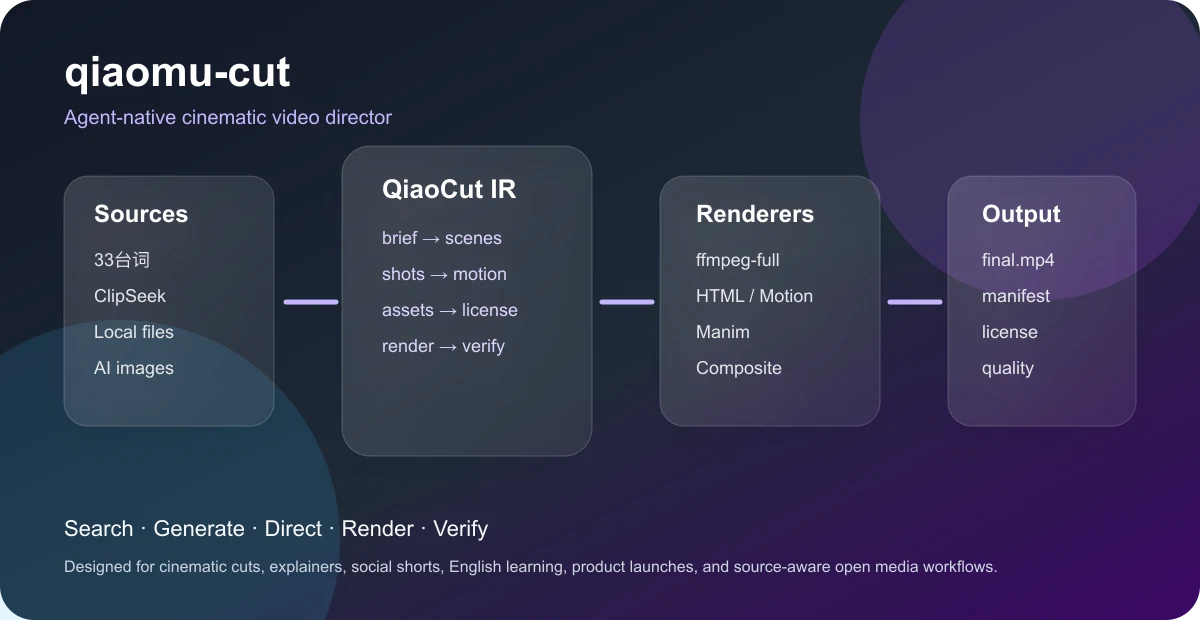
Qiaomu Cut is an Agent Skill maintained by joeseesun, with a bundled qcut command-line tool. The assistant interprets the request, chooses a workflow and writes the storyboard and project files. Scripts handle media intake, captions, scene capture, audio/video assembly and selected checks. It suits people who want to retain and revise a video project; installing it does not turn a sentence into a guaranteed publishable film.
There are two central documents. qiaocut-ir.json describes intent, visual direction and scenes; timeline.json references actual local media, time ranges, captions and audio. scaffold creates the first layer and asset records, but does not author the timeline. HTML, SVG and Manim rendering is implemented: render those scenes to intermediate MP4 files before adding them to the general timeline.
The four routes below cover local editing, English-learning montages, code-drawn UI motion and explainer preparation before paid generation. You can use an existing recording. A transcript is not automatically a timed subtitle track, and a generated image, clip or voice must be saved and documented before it is adopted. Completion includes watching the actual export with sound, as well as checking its files and reports.
Sources and verification
Sources checked
Reviewed against fixed commit 5498135, including documentation, actual entry points and relevant implementation. No third-party media tools were installed, these tasks were not executed, and generation quality was not tested.