Local editor · layout templates · deliberate exports
HTML Anything
Turn prepared content into checkable HTML
Use a configured coding CLI to turn articles, data and outlines into locally previewed pages, decks and cards, then choose the right export.
 Open original
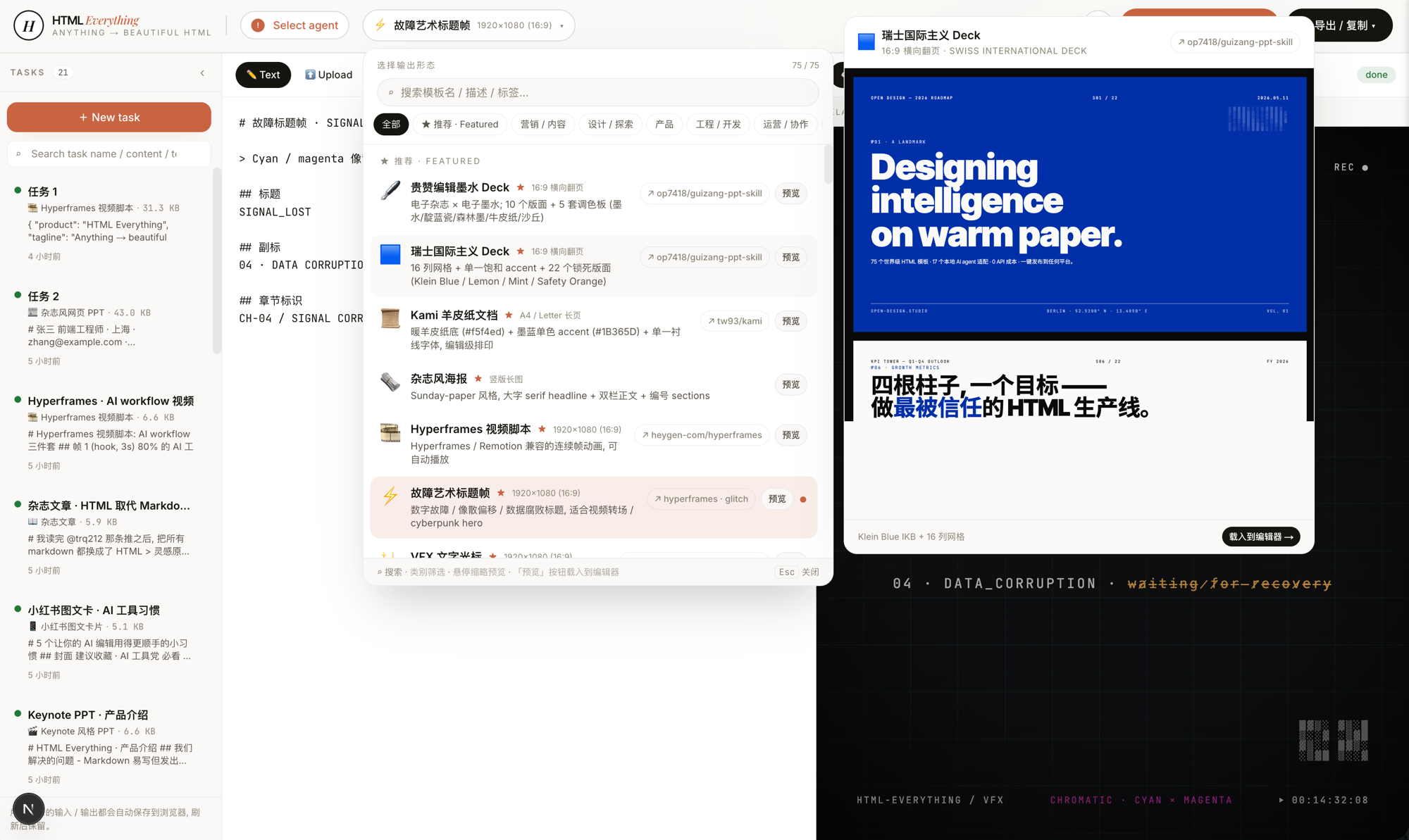
Tasks, the template picker and a sample deck appear together. Choosing a template and loading an author example are different actions; check the active task before adding your own material.
Author imageOriginal repository screenshot, not redrawn or reproduced here. It still shows the older count of 75; this page’s count of 81 comes from the reviewed source. Promotional copy and demonstration metrics in the image are not evidence of current capabilities or business results.
Hosts listed by the author
- Claude Code
- Codex
- Cursor
- Gemini CLI
- GitHub Copilot
- OpenCode
- GitHub stars
- 9,304
- Version
- 0.1.0
- Checked
Take one short article through generation, download and paste
Confirm your CLI works, then choose Magazine Article for a short article you can compare paragraph by paragraph. Download HTML and inspect a pasted WeChat draft before moving on to tables and multi-slide decks.
Pick a task and get started
Create a blank task, find the template by its display name below, then paste the request and real source into the left editor. IDs in parentheses identify source folders; use display names for template search. Perform exports and destination checks in the interface.
First run: prepare a short Markdown article and accurate byline. Start the app, select an authenticated Claude Code or Codex with model set to default, and create a blank task. Search for Magazine Article and click its name (article-magazine), then paste the request and article into the left editor and choose Convert to HTML.
Start the local editor
This is a local app. Prepare Node.js, pnpm and an authenticated coding CLI, then follow the first task. Copying one SKILL.md does not replace the runtime.
Read the author’s setup and sourcegit clone https://github.com/nexu-io/html-anything.git cd html-anything git checkout 975fb3bcb98f1777781fb4c738902d36e32c8c46 pnpm install pnpm -F @html-anything/next devConfirm that the selected CLI can actually run
After the first task’s commands, open http://localhost:3000 and select an authenticated CLI with model set to default. If detection fails, first make sure the terminal that starts the app can find the CLI, then rescan in Settings. The custom-path field appears only for a detected, selected CLI. The source has 20 detection entries and 13 callable adapters; 7 protocol entries remain unimplemented. An installed label proves neither authentication nor successful generation. Run this process-invoking backend as a local editor, rather than exposing it as an ordinary static site.
Inspect CLI invocationGive your AI this first task
These are editorial task examples. Replace brackets with real material and check both generated output and exported files. We have not run model generation for this guide.
Lay out the finished source below as a magazine-style HTML article. Preserve the entire text, heading hierarchy, quotations, links and captions. Do not change facts or invent an author, date, reading time or metrics. Use typography when no cover image is supplied. Audience: [readers]. Page title: [title]. Byline and date: [supply or omit]. Brand color: [color]. Prioritize reading: a comfortable line length on desktop and no page-level horizontal scrolling at 390px. Wrap long links and keep wide tables inside their own scrolling containers. Return complete HTML without Markdown fences or labels such as “source content.” Preserve source links and keep the article readable if external fonts or images fail. Copying to WeChat is not publication. This is the sole article source: [Paste the full Markdown here]
Check what you receive
- The preview contains this input, including its opening, ending, quotations and links. Do not mistake an automatically displayed template example for a new generation.
- Download HTML first, then choose WeChat in the export menu and paste into a draft. Recheck headings, tables, images, links and phone preview in the destination editor before publishing.
- Resolve failed logs or truncated input before export. Check CLI authentication, quota and input length; a good local preview does not establish identical pasted formatting.
More about this skill
HTML Anything is nexu-io’s local web editor with bundled SKILL.md layout templates. Put Markdown, a table or text on the left, choose the intended form, and a coding CLI on your machine generates HTML for the preview. It suits people who already have their material and need a better reading or delivery format. Templates guide layout; facts still need to be checked against the input.
The reviewed source contains 81 bundled templates covering articles, decks, cards, reports, résumés and video frames. The picker offers author examples before you create a task with your own content. A preview can display an example when no generated output exists, so seeing a polished page does not establish that your current material has been processed.
Choose exports by their actual purpose. WeChat and Zhihu options copy content to the clipboard; PNG produces an image. Deck exports include individual slide images, browser-printed PDF and image-based PPTX. Video export produces a Remotion project archive that still needs rendering. The four paths below connect inputs, interface actions and practical checks.
Sources and verification
Sources checked
Prepared from source revision 975fb3b, templates, export code and author screenshots read on 2026-10-30. Version 0.1.0 is the workspace package version. We did not install the app, invoke models or test pasting into external platforms.