Connect each step to your real experience
Career Ops
Evaluate Roles, Prepare Materials and Track Applications
Compare a posting with your own evidence, prepare a CV and application answers for roles worth pursuing, rehearse the interview and keep a traceable search record.
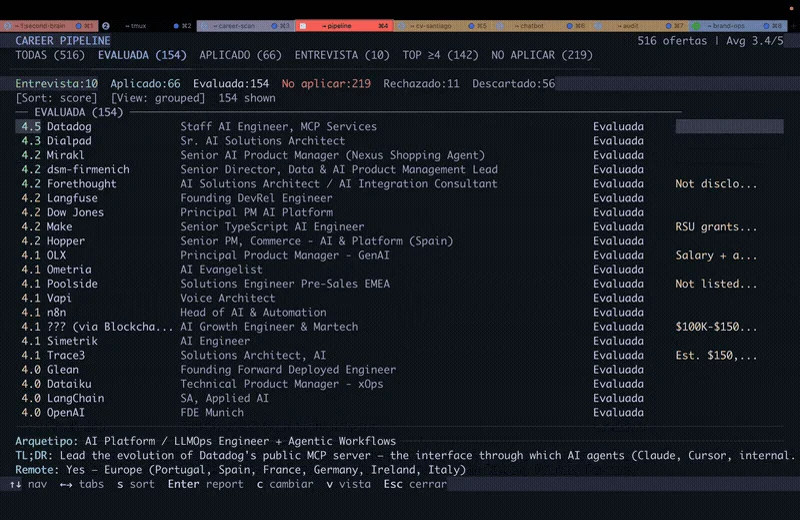
Project demo
View example sourceAvailable entry points
- Claude Code
- Codex
- Other supported AI CLIs
- GitHub stars
- 78,668
- Version
- 1.38.0
- Checked
- Categories
- Product & ProjectWriting & Research
Start with your CV and one posting
Confirm your targets and evidence, then run oferta. Inspect the basis for each match and gap before making a PDF or preparing a form. You can challenge a score without adding fictional experience to improve it.
Pick a task and get started
Create the workspace in a terminal, open your assistant and finish profile onboarding. Choose one task below. For a first run, evaluate a single role and inspect the saved report and tracker entry.
Finish profile setup, then provide one posting URL or the full job description. oferta evaluates without automatically producing a PDF. Pasting a job without a mode instead starts the full evaluation, CV and tracking workflow.
Create a local job-search workspace
Run these lines in a local terminal. The last opens an already configured Claude Code; use codex instead if that is your assistant. The installer downloads the latest stable release and installs dependencies; 1.38.0 was verified for this review. If release resolution fails, it warns and falls back to the main branch. Complete personal setup in chat before running a task.
Read the author’s setup guidenpx @santifer/career-ops init cd career-ops claudeEstablish your profile before assessing a role
Provide your CV and goals in the first conversation. The assistant creates cv.md, config/profile.yml, modes/_profile.md and other personal files, then runs the author’s configuration checks. Confirm your target roles and locations. Set language.output for the language you want; market context is a separate choice. Next ask to run career-ops in oferta mode with one posting. Inspect the report in reports/ and the Evaluated entry in data/applications.md. If you chose a custom data directory, use the actual location the assistant resolves.
Read setup and configuration checksGive your AI this first task
These are editorial prompts based on documented modes, not records of a tested run. Supply the real posting, report or file each prompt refers to; missing inputs should be requested rather than replaced with the sample candidate.
Run career-ops in oferta mode for the one posting URL or full job description I provide. Identify the active data directory, then read my cv.md, config/profile.yml, modes/_profile.md and article-digest.md if present. Complete first-run onboarding if needed; do not use the sample candidate’s history or targets. For a URL, check whether the posting is still active. If the description cannot be read, explain why and request the text rather than declaring the role closed. With pasted text alone, mark liveness as unverified. Determine requirement importance and its basis from the JD before mapping my experience. Show important gaps, hard constraints and their sources. Make a holistic judgment across the five documented dimensions, with posting-legitimacy signals and evidence confidence reported separately. Do not convert the score into an interview probability. Save the complete report and register it as Evaluated. Return the actual report path and record identifiers. Do not generate a PDF or fill an application in this run.
Check what you receive
- A report under reports/ and an Evaluated tracker entry. The report covers fit, gaps, level strategy, compensation evidence, tailoring, interview preparation and posting-legitimacy observations; some sections depend on the evidence and score.
- Important requirements trace to the posting, and claims about you trace to your own materials. Missing pay, working-arrangement or eligibility information remains an open question with a verification priority.
- Compare the employer, role, URL and score across the report and tracker. An evaluation based only on pasted text must not claim the opening was verified as active.
More about this skill
Career Ops is an open-source job-search workspace started by santifer. Bring together a master CV, career goals, project evidence and a posting, then ask your AI assistant to evaluate the role, prepare materials, help with a form or review progress. The skill routes the request; repository scripts, templates and local files carry out and preserve the workflow. A copy of SKILL.md alone is not a complete installation.
Its first job is to help you allocate preparation time. oferta reads the posting, checks availability and maps significant requirements to your actual experience, including gaps and constraints. Experience fit, career direction, compensation, cultural signals and risks inform a holistic score from 1 to 5. Requirement importance, posting legitimacy and confidence in the evidence are separate judgments, not ingredients for a probability of success.
Decide how much to invest after that evaluation. Keep the report, make a tailored PDF, prepare form answers or rehearse a particular interview round. Pasting a job directly invokes auto-pipeline and links evaluation, materials and tracking. This guide begins with oferta so you can inspect the reasoning before making a CV. The default advice is against applying below 4.0, with room for your explicit reason to proceed.
The workspace becomes more useful as your evidence improves. Your master CV and project material establish facts; the story bank supplies reusable narratives. Repeating a number in earlier coaching drafts does not verify it. Tailoring changes emphasis and wording, without adding credentials. Automated fact and formatting checks have limits, so compare the original evidence, generated document and actual application form before sending.
Reports and tracking files normally live on your machine. When you use a cloud model, relevant material goes to the provider you chose. The project uses the MIT license; model usage and external services you enable have their own costs. The tasks here do not require email or Notion integrations. apply can assist with form filling, while you make the final submission and confirm success before a prepared application becomes Applied.
Sources and verification
Sources checked
Atlasnote reviewed the author’s fixed-commit documentation, modes and key scripts, and compared scoring and application rules with 1.38.0. We did not install or run the third-party workflow or submit candidate data to an employer.